As we continue to explore the resources available in the text, Assistive Technology in the Classroom (Dell, et all, page 290) today's blog will offer the author's tips on how to help a student overcome learned helplessness. Learned helplessness is a lack of communication on the student's part because of years of being told or implied that they could not do it on their own, as such they relay on others, and will not initiate or understand what is within their control.
Tuesday, November 19, 2013
Strategies to Overcome Learned Helplessness
As we continue to explore the resources available in the text, Assistive Technology in the Classroom (Dell, et all, page 290) today's blog will offer the author's tips on how to help a student overcome learned helplessness. Learned helplessness is a lack of communication on the student's part because of years of being told or implied that they could not do it on their own, as such they relay on others, and will not initiate or understand what is within their control.
Assistive Technology Low Tech to Mid Tech for Completing Math Assignments
Chapter 5
Resources
(in the low and mid tech range) available to teach Mathematics to Students with Special Needs.
Sometimes with so many high tech options available, it is easy to lost sight of how many resources are available at little or no cost that can also meet many of your student needs. The purpose of today's blog is to give you a visual inventory for reference and reminder.


Resources:
Images courtesy of the Onion Mountain Technology website - product catalog
Assistive Technology In the Classroom: Enhancing the School Experiences of Students with Disabilities, Second Edition 2012 by Amy G. Dell, Deborah A. Newton, Jerry G. Petroff, Pearson
Assistive Technology to Teach Math Concepts, Math Skills, and Problem Solving
In my two prior blogs we investigated how to meet the needs of automaticity, fluency, and the challenges of visual-spatial or motor control problems. Today we are going to address how to use technology to help students become problem solvers, that is taking the skills of understanding the concepts, using fact fluency and applying that knowledge to address higher level thinking, and problem solving - multi-step processes. To guide this investigation I will again be using the text pictured above, Assistive Technology in the Classroom (Dell, et. al pages 130- 134).
Below are 2 categories that will offer you assistance: Website Based & Authoring Applications
1) Websites for your Review, Investigation, and Play!
Read under the "About" tab to find out the computer hardware and operating system requirements. You can download a free trial version. Purchase prices range from $39.95 for a single license to $999 for a standard school license (and there are many options in between.
This website, maintained by the National Council of teachers of Mathematics is free :)
It offers lessons to present in class, and a variety of interactive manipulative activities.
2) Authoring Applications
If you would like to tailor the applications to meet your students' specific needs; and/or tailor a lesson to a core concept, you may want to investigate an authoring applications which allows you to go beyond what is offered "out of the box".
- Clicker 5 (Crick Software)
- Classroom Suite (Cambium Learning)
Resource:
Assistive Technology In the Classroom: Enhancing the School Experiences of Students with Disabilities, Second Edition 2012 by Amy G. Dell, Deborah A. Newton, Jerry G. Petroff, Pearson
Assistive Technology for Visual-Spatial or Motor Control

Tools you can use to address visual-spatial or motor control difficulties
This blog will continue to address how to use technology to meet your needs in math instruction, specifically we will investigate how to use technology to address visual-spatial or motor control difficulties. Now that we have addressed math automaticity, we need to address what to do when the student has gained confidence in their math facts, but their fine motor skills prevent them from either copying work correctly or recording their computation correctly. Knowing this, today's blog will present technology resources that address theses needs. Again, I will be accessing the material presented in the text, Assistive Technology in the Classroom (Dell, et. al, pages 124-130).
* Math Pad (Cambrium Learning) - Allows a student to use the mouse or keyboard to enter dat after solving a math problem (eliminates the mistakes of recording with pencil with paper). This is a talking math worksheet. Teachers can generate customized worksheets to meet students needs, and review work.
* Math Pad Plus (Cambrium Learning) - Extends all of the features of Math Pad and extends to include fractions and ratios.
* Math Pad (Cambrium Learning) - Allows a student to use the mouse or keyboard to enter dat after solving a math problem (eliminates the mistakes of recording with pencil with paper). This is a talking math worksheet. Teachers can generate customized worksheets to meet students needs, and review work. * Math Pad Plus (Cambrium Learning) - Extends all of the features of Math Pad and extends to include fractions and ratios.
* Virtual Pencil (VP) & VP Algebra allow students to solve mathematical problems with the logic of paper and pencil, but by using speech feedback. Password protection is available to prevent students from altering VP Algebra files.
Resource:
Assistive Technology In the Classroom: Enhancing the School Experiences of Students with Disabilities, Second Edition 2012 by Amy G. Dell, Deborah A. Newton, Jerry G. Petroff, Pearson
Monday, November 18, 2013
Assistive Technology: TECHMATRIX
There is a plethora of resources available to meet the needs of students with special needs. TO minimize frustration with the process, today's blog will give you access to TECHMATRIX a compilation tool that allows you to specify student needs, search for products, and create a comparison product matrix that will ease the decision making process - and it is FREE!
TechMatrix Link: http://techmatrix.org/
Here is the criteria I entered:
Content area: math
Grade level: intermediate elementary
IDEA Disability Category: Specific Learning Disability
Instructional Support: Opportunities to Learn Concepts & Practice and Reinforcement
Input Options: Voice Recognition
Text to Speech: Reads instructions AND Supports reading math equations
After that all I had to do was click "programs" and a list of 7 products was generated for me to review. Based on the initial info provided about each program, I selected 3 to compare.
I am providing you with a screen shot to illustrate what the comparison
matrix looks like. The finished product has more criteria listed for each product than shown in my screen shot illustration.
If you are investigating products for purchase, this website should be on your list.
TechMatrix Link: http://techmatrix.org/
Here is the criteria I entered:
Content area: math
Grade level: intermediate elementary
IDEA Disability Category: Specific Learning Disability
Instructional Support: Opportunities to Learn Concepts & Practice and Reinforcement
Input Options: Voice Recognition
Text to Speech: Reads instructions AND Supports reading math equations
After that all I had to do was click "programs" and a list of 7 products was generated for me to review. Based on the initial info provided about each program, I selected 3 to compare.
I am providing you with a screen shot to illustrate what the comparison matrix looks like. The finished product has more criteria listed for each product than shown in my screen shot illustration.
If you are investigating products for purchase, this website should be on your list.
Assistive Technology & Automaticity / Math Fact Fluency
Educational Applications
Used to Address Automaticity / Math Fact Fluency
I remember learning math facts, what my kids call "old school". I had to write the addition, subtraction, and multiplication facts on index cards and write the answers on the back - of course you can buy them now at the dollar store.
This is inherently a skill that needs practice. To find the best technology to meet your student's needs you will need to consider the child not the missing skill when making the match. The following examples are again compliments of the text book (pictured to the left).
* Low and Mid Tech tools: Addition and multiplication charts and calculators
* FASTT Math (Fluency and Automaticity through Systematic Teaching and Technology - program assesses, measures response time, and generates customized activities based on student's results.
* Timex Attack: Created by the team produced Sony Play Station this program engages students in a game environment and motivates students to practice and masters their 2 through 12 times tables. There is a free download base version, and a more advanced version available for purchase.
* The ArithmAttack: Allows students to attack all of the skills: addition, subtraction, multiplication, division, integers, fractions and rations. This system is all inclusive and allows for single or multiplayer games, mouse or keyboard control, and the ability to require a pass code for private games.
Whatever you use to build automaticity, the goal is to allow the student to focus on the process of problem solving instead of
Resource:
Assistive Technology In the Classroom: Enhancing the School Experiences of Students with Disabilities, Second Edition 2012 by Amy G. Dell, Deborah A. Newton, Jerry G. Petroff, Pearson
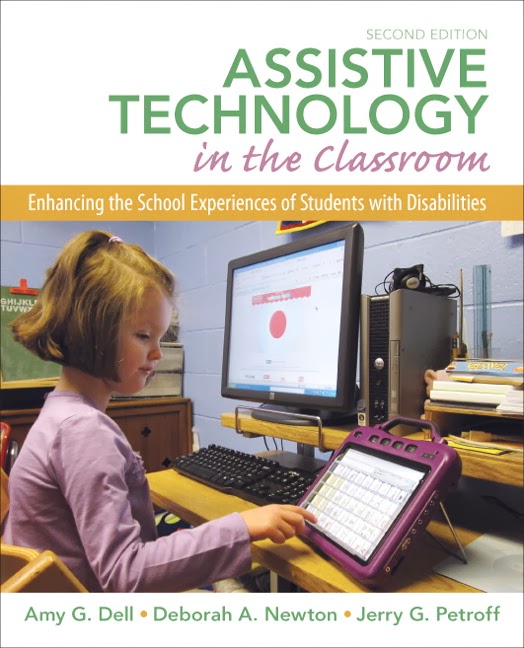
Assistive Technology - Key Questions for Selection

Chapter 5
Key Questions that Should Be Considered When Selecting Educational Applications to Meet Students' Goals and Objectives
We now have a working knowledge of Assistive Technology, and today's blog is dedicated to Assistive Technology related specifically to the subject of Math. When you are searching for Educational Application to use for a student with special needs, it is best to approach the task with a checklist of essential questions. Using the authors of "Assistive Technology in the Classroom" (Dell et. al, page 121) as a guide the following questions will simplify your task:
* What is the goal of purpose of computer use?example: teaching basic concepts and academic skills
* What is the content of educational application?
example: Does it match the student's interests?
* What aspects of the the program meet the child's specific needs?
example: children with visual impairments often need speech output
* How flexible is the educational application?
example: Can levels be selected or modified?
Resource:
Assistive Technology In the Classroom: Enhancing the School Experiences of Students with Disabilities, Second Edition 2012 by Amy G. Dell, Deborah A. Newton, Jerry G. Petroff, Pearson
Subscribe to:
Posts (Atom)


